S3 Virus Scanning: How to Scan Amazon S3 Uploads for Malware
Amazon S3 is where most files from outside your organization end up. Think of documents customers upload through a presigned URL, invoices a partner drops via SFTP, CSV exports pushed by a third-party integration, or attachments your support tool archives every night. S3 stores every one of them reliably, encrypts them, and replicates them across Availability Zones. What it doesn’t do is check whether a file contains a virus, a trojan, or ransomware. The infected PDF sits in your bucket next to the clean ones until a colleague opens it, a downstream service processes it, or your application serves it to another customer.

This guide explains why S3 buckets need their own malware scan, which options you have for S3 virus scanning, and how to build an event-driven scan with the attachmentAV Virus and Malware Scan API: a bucket policy, one Lambda function that submits new objects, and one that tags them with the scan result. If your files must never leave your AWS account, the last sections cover the self-hosted alternative.
Why S3 buckets need a virus scan
S3 security features are about access, not content. Bucket policies decide who can read and write, Block Public Access prevents accidental exposure, and encryption protects the bytes at rest. None of these look inside a file. Access controls decide who can touch a file, but only a malware scan tells you whether the file is safe to touch.
That matters for three reasons:
- Buckets are shared entry points. One bucket often feeds several consumers: a web app, a data pipeline, a support team. A single malicious upload reaches all of them.
- Downstream services trust the bucket. Lambda functions, Glue jobs, and internal tools usually assume that anything in your own bucket is safe to open, parse, or forward.
- Compliance asks for it. Frameworks like ISO 27001 and many customer security questionnaires expect files from untrusted sources to be checked for malware before they are processed.
Options for S3 virus scanning
Search for “S3 virus scan” and you will find five common approaches:
- ClamAV in Lambda or on EC2. The engine is free to download, but not free to operate. You package the binary and its signature database, update signatures several times a day, fight Lambda size and memory limits, and accept a detection rate that lags behind commercial engines.
- Amazon GuardDuty Malware Protection for S3. A managed AWS feature that scans new objects in selected buckets and tags them with the result. It is a good fit if you already run GuardDuty and the scan options cover your needs. Check the AWS documentation for supported file sizes, encryption types, and pricing.
- A malware scanning API. Your bucket triggers a function, the function hands the object to an API, and the API returns a verdict. No engine, no signature updates, no scaling work on your side.
- A self-hosted scanning API in your own AWS account. The same API pattern, but the scan engine runs in your VPC so that files never leave your account.
- A complete S3 security solution. Products like bucketAV go beyond a single scan request. They run in your AWS account and cover real-time, scheduled, and on-demand scans across many buckets and accounts, automated remediation, reporting, and integrations with services like AWS Security Hub. No code required.
attachmentAV covers options 3 and 4 with the same Sophos engine. The rest of this guide uses the SaaS API first and then shows when to switch to the self-hosted version. If you are looking for option 5, jump to Protect all your buckets with bucketAV.
How S3 virus scanning with attachmentAV works
The attachmentAV API can download objects directly from your bucket. You don’t have to stream the file through your Lambda function or create a presigned URL: you send the bucket name and object key, and attachmentAV fetches the object itself.
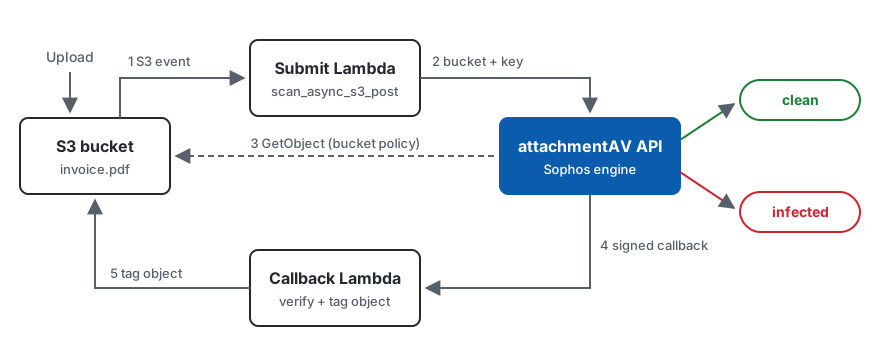
- A file lands in your bucket and S3 sends an event notification to the submit Lambda function.
- The function calls
POST /v1/scan/async/s3with the bucket, the key, and a callback URL. - attachmentAV downloads the object from your bucket, allowed by a bucket policy, and scans it with Sophos.
- attachmentAV sends the signed result to your callback URL.
- The callback Lambda function verifies the signature and tags the object with
clean,infected, orno.
The S3 endpoints come in two flavors. POST /v1/scan/sync/s3 returns the result in the same request and handles objects up to 200 MB within a 60-second timeout. POST /v1/scan/async/s3 handles objects up to 5 GB and delivers the result via callback or polling. For an event-driven bucket scan, async is the better default: your Lambda function returns immediately and large files don’t run into timeouts. Check the API definition for all parameters.
Step 1: Grant attachmentAV read access to the bucket
attachmentAV needs permission to read the objects it scans. Attach the following bucket policy and replace BUCKET_NAME with the name of your bucket:
{
  "Version": "2012-10-17",
  "Statement": [{
    "Sid": "attachmentAV",
    "Effect": "Allow",
    "Principal": {
      "AWS": "arn:aws:iam::450892694845:root"
    },
    "Action": "s3:GetObject*",
    "Resource": "arn:aws:s3:::BUCKET_NAME/*"
  }]
}
The policy grants read access to objects only. attachmentAV can’t list, write, or delete anything in your bucket. Note that the SaaS API doesn’t support objects encrypted with KMS. If your bucket uses SSE-KMS, use the self-hosted version described below. The bucket policy section of the documentation always has the current policy.
Step 2: Submit every new object for scanning
Create a Lambda function with the Python runtime and subscribe it to the s3:ObjectCreated:* events of your bucket. The function uses the attachmentAV SDK for Python, so bundle attachmentav-virus-malware-scan-sdk into the deployment package or a Lambda layer.
import json
import os
import urllib.parse

import attachmentav

configuration = attachmentav.Configuration()
configuration.api_key['apiKeyAuth'] = os.environ['ATTACHMENTAV_API_KEY']  # <API_KEY_PLACEHOLDER>
CALLBACK_URL = os.environ['CALLBACK_URL']  # e.g. https://<CALLBACK_HOST_PLACEHOLDER>/


def handler(event, context):
    with attachmentav.ApiClient(configuration) as api_client:
        api = attachmentav.AttachmentAVApi(api_client)
        for record in event['Records']:
            bucket = record['s3']['bucket']['name']
            # Object keys in S3 events are URL-encoded
            key = urllib.parse.unquote_plus(record['s3']['object']['key'])
            version = record['s3']['object'].get('versionId')
            api.scan_async_s3_post(attachmentav.AsyncS3ScanRequest(
                bucket=bucket,
                key=key,
                version=version,
                callback_url=CALLBACK_URL,
                custom_data=json.dumps({'bucket': bucket, 'key': key, 'version': version})
            ))
The function doesn’t wait for the scan. attachmentAV answers with status 204 as soon as the job is accepted. The custom_data field carries the bucket, key, and version through the scan, so the callback knows exactly which object the result belongs to. Pass version only if versioning is turned on for the bucket. Store the API key in AWS Secrets Manager or SSM Parameter Store rather than in plain environment variables for production use.
If your API subscription is in another region than Europe, set configuration.host to the matching endpoint, e.g. https://us.developer.attachmentav.com/v1. The API endpoints list all five regions.
Step 3: Tag the object with the scan result
attachmentAV sends the result via HTTPS POST to your callback URL. A Lambda function URL is the simplest way to receive it. The payload contains status, finding (for infected files), size, realfiletype, and the custom_data you passed in step 2.
Every callback is signed. Before you trust the payload, verify the X-Signature and X-Timestamp headers as described in Verify callbacks. The snippet below expects the verify function and the PUBLIC_KEY_PEM constant from that page in a file named callback_signature.py next to the handler.
import json
import os
import time

import boto3

from callback_signature import PUBLIC_KEY_PEM, verify

s3 = boto3.client('s3')
TENANT_ID = os.environ['ATTACHMENTAV_TENANT_ID']  # from GET /v1/whoami
CALLBACK_URL = os.environ['CALLBACK_URL']  # the same value as in the submit function


def handler(event, context):
    body = event['body']
    headers = event['headers']  # Lambda function URLs pass header names in lowercase
    if not verify(int(time.time() * 1000), PUBLIC_KEY_PEM, headers['x-timestamp'],
                  TENANT_ID, CALLBACK_URL, body, headers['x-signature']):
        return {'statusCode': 403}

    result = json.loads(body)
    target = json.loads(result['custom_data'])
    location = {'Bucket': target['bucket'], 'Key': target['key']}
    if target.get('version'):
        location['VersionId'] = target['version']

    tags = [{'Key': 'attachmentav-status', 'Value': result['status']}]
    if result.get('finding'):
        tags.append({'Key': 'attachmentav-finding', 'Value': result['finding'][:256]})
    # Replaces the existing tag set of the object
    s3.put_object_tagging(**location, Tagging={'TagSet': tags})
    return {'statusCode': 200}
The function returns 200 once the object is tagged. If it fails, attachmentAV retries the delivery several times and records the failure, so you can list callback failures later. Grant the function s3:PutObjectTagging (and s3:PutObjectVersionTagging for versioned buckets) on your bucket.
What to do with each status:
clean: The Sophos engine found nothing. Let downstream consumers process the object.infected: Thefindingfield names the malware. Move the object to a quarantine bucket, delete it, or alert your security team.no: The engine could not process the file. Treat it as untrusted until someone reviews it.
Because the verdict lives on the object, you can enforce it where files are read. A bucket policy statement that denies s3:GetObject to your application roles unless the object tag attachmentav-status equals clean makes sure nobody downloads a file before it has passed the scan. Don’t apply that statement to the attachmentAV principal from step 1: attachmentAV has to read the object while it is still untagged.
Keep files inside your AWS account
Some organizations can’t send files to an external service, no matter how short-lived the processing is. Others encrypt their buckets with customer-managed KMS keys. For both cases, deploy the attachmentAV Virus and Malware Scan API (Self-hosted on AWS) in your own account. It runs on EC2 instances in your own account, reads objects with an IAM role instead of a bucket policy, can decrypt KMS-encrypted objects, and lets you restrict access to specific buckets and keys. See IAM permissions for the details.
The self-hosted API offers the same POST /api/v1/scan/sync/s3 request with bucket, key, and version, and the SDKs work with both versions. The submit function from step 2 only needs a different host, the sync S3 endpoint, and a bearer token, and it gets the result directly instead of via callback.
Protect all your buckets with bucketAV
The API approach fits best when you want to build malware scanning into your own application. If your goal is to secure S3 as a whole, across many buckets and AWS accounts, without writing and maintaining Lambda functions, choose bucketAV instead. bucketAV is a full-blown antivirus solution for Amazon S3, built by the team behind attachmentAV:
- Runs in your AWS account. bucketAV scans files on EC2 instances inside your account. Only the virus definitions are downloaded, your files never leave your infrastructure.
- Choice of engines. Scan with ClamAV, Sophos, or both engines combined, with files up to 5 TB.
- All scan modes. Real-time scanning of new uploads within seconds, on-access scanning, scheduled scans of existing buckets, and on-demand scans of individual files.
- Multi-account and multi-bucket. Scan files in multiple buckets and across AWS accounts.
- Automated remediation. Tag objects, delete or quarantine infected files, or move clean files to another bucket, all configurable without code.
- Reporting and alerting. Periodic reports, notifications via email, Slack, Microsoft Teams, or any HTTPS endpoint, a CloudWatch dashboard, and integrations with AWS Security Hub and AWS Systems Manager OpsCenter.
- Quick setup and AWS billing. A CloudFormation-based installer gets you started in about 15 minutes, and you pay through AWS Marketplace on your monthly AWS invoice.
Check out the bucketAV setup guide for Amazon S3 and start with the 14-day free trial.
Skip the boilerplate with AWS CDK
If you define your infrastructure with AWS CDK, you don’t have to wire up the two functions yourself. Our CDK construct for S3 malware scanning deploys the event trigger, the scan and callback functions, object tagging, and optional deletion of infected files with a few lines of TypeScript.
Start scanning your S3 buckets today
S3 keeps your files safe from unauthorized access, but not from the malware inside them. With a bucket policy, two small Lambda functions, and the Sophos-powered attachmentAV API, every new object is scanned and tagged with clean, infected, or no, without running an antivirus engine yourself. attachmentAV is ISO 27001 certified, GDPR compliant, and deletes your files right after the scan.
Subscribe to the attachmentAV API and add virus scanning to your S3 buckets today.
Published on November 16, 2026 | Written by Andreas