How to Scan Email Attachments for Viruses Automatically
Email is still the busiest delivery channel for malware, and many teams no longer open their attachments by hand. Invoices land in an accounts-payable mailbox and flow straight into the ERP. CVs sent to jobs@ are copied to the applicant tracking system. Order confirmations, signed contracts, and support screenshots are pulled out of shared inboxes by n8n, Make, or a script and dropped into Google Drive, Amazon S3, or a CRM record. Every one of those attachments is untrusted input, and unless you scan email attachments for viruses inside the workflow, nobody checks them again before they are opened, parsed, or shared.

This guide explains what your mail provider already scans, where that protection ends, and how to scan email attachments for viruses automatically, with an n8n workflow, a Make scenario, or a few lines of Python using the attachmentAV Virus and Malware Scan API.
Doesn’t my email provider scan attachments already?
Yes, at delivery time. Gmail scans attachments in the messages you send and receive, rejects messages that carry known viruses, and blocks executable file types such as .exe or .js, even inside archives. Microsoft 365 runs every message through the anti-malware filters of Exchange Online Protection, and organizations with Microsoft Defender for Office 365 can add Safe Attachments, which opens files in a sandbox before delivery.
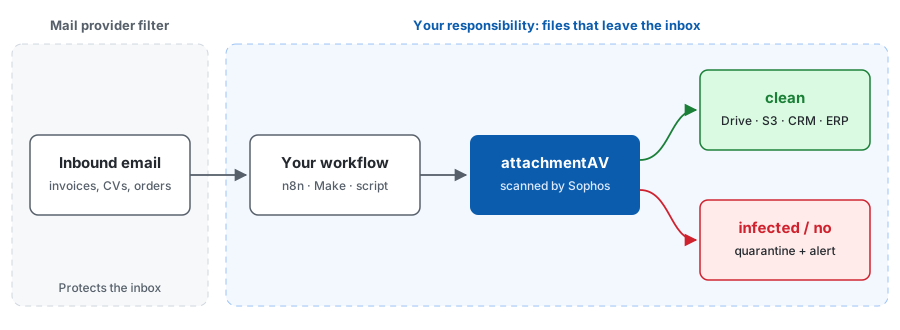
That protection is built for people reading mail in their inbox. It stops being enough the moment an automated workflow takes over:
- The verdict stays in the mailbox. Your workflow fetches the attachment over IMAP or an API and gets bytes, not a scan result. There is nothing to branch on, log, or show an auditor.
- Signatures move on after delivery. A file is scanned once, when the message arrives. If the threat is identified a day later, the attachment that is now sitting in your shared drive is never checked again. Scanning at processing time uses the signature database of that moment.
- Not every mailbox is protected the same way. Service mailboxes on smaller hosting providers, forwarding rules, and legacy mail servers often get basic filtering at best, and advanced sandboxing is a paid add-on on most platforms.
- The destination trusts whatever arrives. An ERP, a ticketing system, or an S3 bucket has no idea that a file came from an external sender. Once it is stored there, it is downloaded by colleagues, customers, and downstream services as if it were safe.
Here is the point to remember: mail filters protect your inbox; they don’t protect the systems your attachments are moved into. The scan belongs in the workflow itself, right after the attachment is extracted and before it is stored anywhere.
Option 1: Scan email attachments with n8n
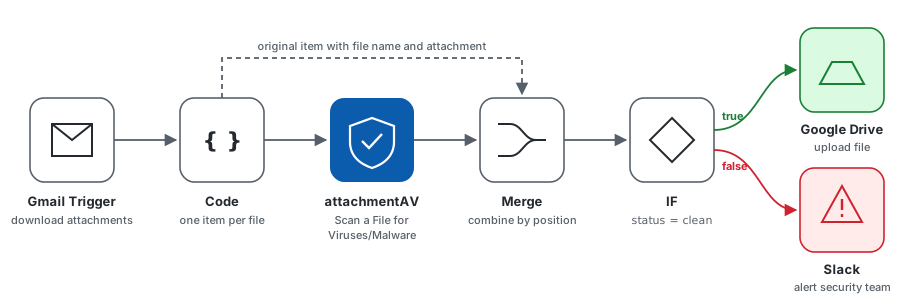
The attachmentAV community node for n8n adds a Scan a File for Viruses/Malware action to your workflows. The following workflow watches a Gmail inbox, scans every attachment, uploads clean files to Google Drive, and alerts your team about everything else.
- Install the node. In n8n, go to Settings > Community Nodes, click Install, and enter
@attachmentav/n8n-nodes-attachmentav. Create a subscription and add your API key as anattachmentAV APIcredential. The setup guide walks through each screen. - Trigger on new mail. Add a Gmail Trigger node (or Email Trigger (IMAP) for any other provider) and enable the option to download attachments. n8n stores them as binary properties named
attachment_0,attachment_1, and so on. - Split attachments into separate items. An email can carry several files, but the scan node works on one binary field per item. A short Code node turns every attachment into its own item:
const items = [];
for (const item of $input.all()) {
  for (const binary of Object.values(item.binary ?? {})) {
    items.push({
      json: { ...item.json, fileName: binary.fileName },
      binary: { data: binary },
    });
  }
}
return items;
- Scan each file. Add the attachmentAV node, choose Scan a File for Viruses/Malware, select your credential, and set Input Binary Field to
data. - Put the file back next to the verdict. The attachmentAV node outputs only the scan result (
status,finding,size,realfiletype), not the file itself. Add a Merge node, set Mode to Combine and Combine By to Position, and connect the Code node to input 1 and the attachmentAV node to input 2. Every item now carries the attachment, its file name, the original email fields, and the scan result. - Route by verdict. After the Merge node, add an IF node that checks whether
{{ $json.status }}equalsclean. Connect the true branch to Google Drive to upload the file, and the false branch to Slack or Send Email to alert your security team with the sender, the file name, and thefinding.
The status field is clean, infected, or no (the engine could not process the file, for example an encrypted archive). Treat no like infected and send it to a person for review rather than letting it through. The n8n node scans files up to 10 MB; see the n8n FAQ for details.
Option 2: Scan email attachments with Make
Prefer Make? The attachmentAV app for Make provides the same scan as a module you place between your email trigger and your storage step. We have two step-by-step tutorials: scanning email attachments for viruses with Make and uploading email attachments to Dropbox after a virus and malware scan. The Make setup guide covers connecting your API key.
Option 3: Scan email attachments with Python
If your mail processing runs in your own code, scan attachments right where you extract them. The following script reads unread messages from an IMAP mailbox and scans every attachment with the attachmentAV SDK for Python.
pip install attachmentav-virus-malware-scan-sdk
import email
import imaplib

import attachmentav

configuration = attachmentav.Configuration()
configuration.api_key['apiKeyAuth'] = "<API_KEY_PLACEHOLDER>"
api_client = attachmentav.ApiClient(configuration)
api_instance = attachmentav.AttachmentAVApi(api_client)

mailbox = imaplib.IMAP4_SSL("<IMAP_HOST_PLACEHOLDER>")
mailbox.login("<USERNAME_PLACEHOLDER>", "<PASSWORD_PLACEHOLDER>")
mailbox.select("INBOX")

_, message_ids = mailbox.search(None, "UNSEEN")
for message_id in message_ids[0].split():
    _, data = mailbox.fetch(message_id, "(RFC822)")
    message = email.message_from_bytes(data[0][1])
    for part in message.walk():
        filename = part.get_filename()
        if not filename:
            continue
        content = part.get_payload(decode=True)
        scan_result = api_instance.scan_sync_binary_post(content)
        if scan_result.status == "clean":
            print(f"{filename}: clean")  # hand the file over to your pipeline
        else:
            print(f"{filename}: {scan_result.status} {scan_result.finding or ''}")  # quarantine and alert

mailbox.logout()
The synchronous binary endpoint returns the verdict within seconds for attachments up to 10 MB. For larger files, upload the attachment to your own storage first and use the asynchronous mode, which handles files up to 5 GB and delivers the result to a callback URL. The API documentation describes both modes, and realfiletype in the response tells you what the file really is, regardless of the extension the sender chose.
What to do with infected attachments
A scan is only useful if the workflow acts on it. A few rules that work well in practice:
- Never store first and scan later. Scan before the file reaches Drive, S3, or your CRM, so an infected attachment never becomes downloadable.
- Quarantine, don’t delete. Move the message to a quarantine label or folder. Your security team will want the original for analysis, and false positives happen.
- Notify the right people. Alert the security team with sender, subject, file name, and
finding, and tell the business owner that a document is missing from today’s batch. - Log every verdict. A log of scanned files and results is the evidence that compliance audits under ISO 27001 or GDPR ask for.
What you get with attachmentAV
- Sophos-powered scanning. Every attachment is checked by the Sophos engine with hourly signature updates, no antivirus to install or patch.
- Integrations for the tools you already use. Dedicated nodes and modules for n8n and Make, SDKs for Python, Java, JavaScript/TypeScript, and PHP, plus a CLI.
- Data stays where you need it. Choose Europe, United States, Canada, India, or Australia. Files are encrypted in transit and at rest and deleted immediately after processing.
- Certified and compliant. attachmentAV is ISO 27001 certified and GDPR compliant, built by widdix GmbH in Germany.
If attachments must not leave your own cloud, the self-hosted Virus and Malware Scan API runs the same scan inside your AWS account.
Scan your email attachments today
Your mail provider keeps viruses out of the inbox; your workflows decide where attachments go next. Adding a malware scan between the mailbox and your storage takes one node in n8n, one module in Make, or a few lines of code, and it closes the gap that inbox filters leave open.
Subscribe to attachmentAV for n8n or the attachmentAV API and start scanning email attachments for viruses today.
Published on November 5, 2026 | Written by Andreas