Virus Scan for Symfony: Malware Protection for PHP Uploads, Sync and Async
Symfony is the framework behind many long-lived business applications: customer portals, supplier onboarding, HR systems, and document workflows. In these applications, files rarely stay where they were uploaded. An invoice from a supplier ends up in the accounting team’s inbox, a CV is opened by three recruiters, a signed contract is archived for ten years. If one of those files carries a virus or ransomware, your Symfony application has distributed it to everyone who trusts it. Adding a virus scan is the easy part. The more interesting question is when the scan happens: while the user waits for the response, or in the background after the upload. This post shows both approaches with the attachmentAV SDK for PHP: a sync scan for everyday uploads, and an async scan with signed callbacks for large files.

Sync or async: which one do you need?
The attachmentAV Virus and Malware Scan API offers two scan modes.
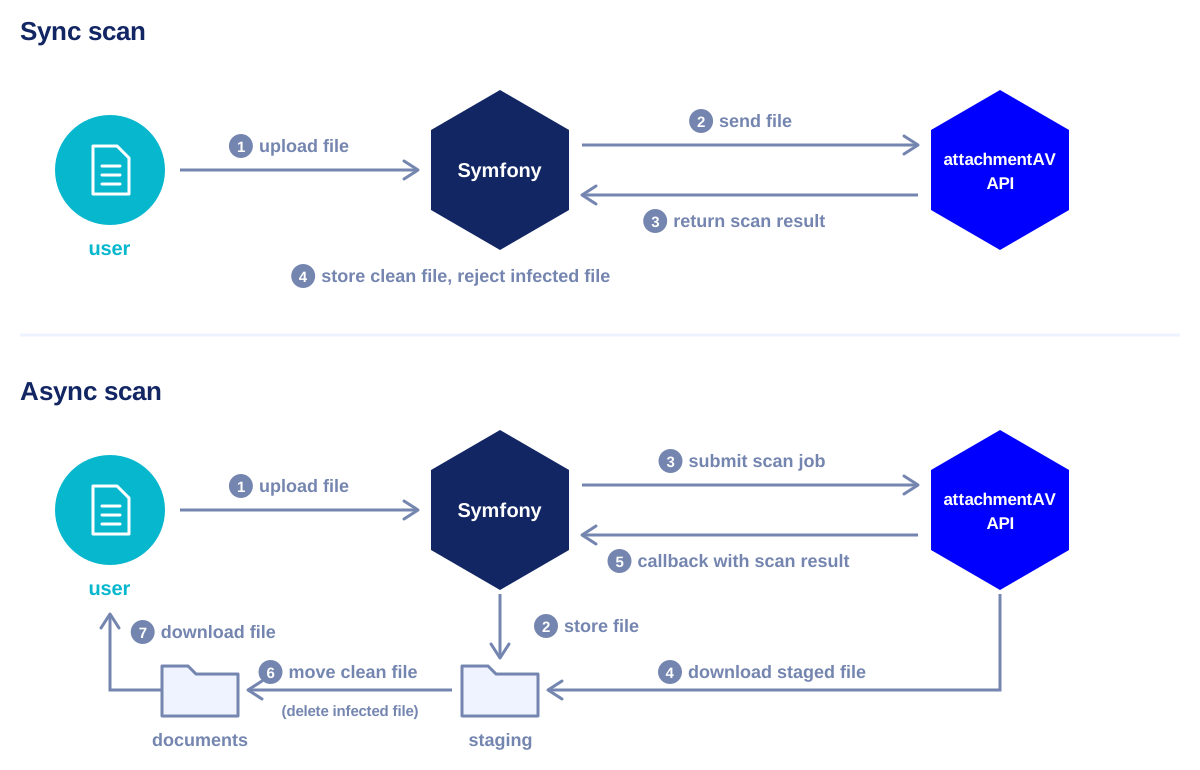
- Sync: your Symfony controller sends the file and receives the scan result in the same HTTP request, typically within a few seconds. Ideal for upload forms where you want to accept or reject the file right away. Files up to 10 MB can be uploaded directly, files up to 200 MB can be scanned by URL.
- Async: your Symfony application submits a scan job and returns immediately. attachmentAV downloads the file from a URL, scans it in the background, and sends the scan result to your callback URL. Files up to 5 GB are supported.
The API definition documents all limits and endpoints in detail. Let’s start with sync.
Sync scan: try the Symfony example
The SDK repository contains a minimal Symfony app: an upload form that scans the file and shows the result. You need Docker and an API key, which you get by subscribing to the attachmentAV API (SaaS).
git clone https://github.com/widdix/attachmentav-sdk-php.git
cd attachmentav-sdk-php/examples/symfony
ATTACHMENTAV_API_KEY=<API_KEY_PLACEHOLDER> ATTACHMENTAV_REGION=eu docker compose up --build
The Docker image creates a fresh Symfony skeleton with PHP 8.4, installs the SDK together with Twig, the CSRF component, and Symfony HttpClient, and copies the example files into the project. Open http://localhost:8001 and upload a file. To trigger a detection, upload the EICAR test file, a harmless file that every antivirus engine reports as malware.
Running the attachmentAV API self-hosted in your AWS account? The same example works against your own endpoint.
ATTACHMENTAV_DEPLOYMENT=self-hosted ATTACHMENTAV_API_KEY=<API_KEY_PLACEHOLDER> \
  ATTACHMENTAV_BASE_URL=https://attachmentav.yourcompany.com/api/v1 docker compose up --build
Sync scan: how the code works
In your own project, install the SDK with Composer. The SDK talks HTTP through any PSR-18 client. With symfony/http-client and nyholm/psr7 installed, it picks up Symfony’s HTTP client automatically.
composer require attachmentav/virus-scan-sdk symfony/http-client nyholm/psr7
Register the SDK as a service
There is no bundle to enable. A few lines in config/packages/attachmentav.yaml register AttachmentAVApi in the service container, configured from environment variables.
services:
    AttachmentAV\Configuration:
        factory: ['AttachmentAV\Configuration', 'fromArray']
        arguments:
            - deployment: '%env(default:attachmentav_default_deployment:ATTACHMENTAV_DEPLOYMENT)%'
              api_key: '%env(ATTACHMENTAV_API_KEY)%'
              region: '%env(default:attachmentav_default_region:ATTACHMENTAV_REGION)%'
              base_url: '%env(default::ATTACHMENTAV_BASE_URL)%'

    AttachmentAV\AttachmentAVApi:
        arguments:
            $configuration: '@AttachmentAV\Configuration'

parameters:
    attachmentav_default_deployment: 'saas'
    attachmentav_default_region: 'eu'
Put ATTACHMENTAV_API_KEY into .env.local or, better, into Symfony’s secrets vault. The region decides where your files are scanned: Europe (eu), United States, Canada, India, or Australia.
The controller
With the service registered, autowiring injects AttachmentAVApi into the controller. The controller checks the CSRF token and the upload, then hands the temporary file to scanSyncFile().
namespace App\Controller;

use AttachmentAV\AttachmentAVApi;
use AttachmentAV\Exception\ExceptionInterface;
use Symfony\Bundle\FrameworkBundle\Controller\AbstractController;
use Symfony\Component\HttpFoundation\File\UploadedFile;
use Symfony\Component\HttpFoundation\Request;
use Symfony\Component\HttpFoundation\Response;
use Symfony\Component\Routing\Attribute\Route;

class ScanController extends AbstractController
{
    // The attachmentAV API (SaaS) accepts files up to 10 MB for sync scans.
    private const MAX_FILE_SIZE = 10 * 1024 * 1024;

    public function __construct(private AttachmentAVApi $attachmentAV)
    {
    }

    #[Route('/', name: 'scan', methods: ['GET', 'POST'])]
    public function scan(Request $request): Response
    {
        if (!$request->isMethod('POST')) {
            return $this->render('scan.html.twig');
        }

        if (!$this->isCsrfTokenValid('scan', (string) $request->request->get('_token'))) {
            return $this->render('scan.html.twig', ['error' => 'Invalid CSRF token, please try again.'], new Response('', 400));
        }

        $file = $request->files->get('file');
        if (!$file instanceof UploadedFile || !$file->isValid()) {
            return $this->render('scan.html.twig', ['error' => 'Please select a file.'], new Response('', 422));
        }
        if ($file->getSize() > self::MAX_FILE_SIZE) {
            return $this->render('scan.html.twig', ['error' => 'The file must not be larger than 10 MB.'], new Response('', 422));
        }

        try {
            $result = $this->attachmentAV->scanSyncFile($file->getPathname());
        } catch (ExceptionInterface $e) {
            return $this->render('scan.html.twig', [
                'filename' => $file->getClientOriginalName(),
                'error' => $e->getMessage(),
            ], new Response('', 502));
        }

        return $this->render('scan.html.twig', [
            'filename' => $file->getClientOriginalName(),
            'result' => $result,
        ]);
    }
}
A few details worth pointing out:
getPathname()returns the path of PHP’s temporary upload file. The scan happens before the file is moved anywhere, so an infected file never reaches your storage.- Every SDK exception implements
ExceptionInterface. Onecatchcovers network errors, an invalid API key, and an exceeded quota. Throttled requests are retried with exponential backoff before an exception is thrown. - The full example also handles uploads larger than PHP’s
post_max_size. PHP drops the entire request body in that case, including the CSRF token, so the controller detects the empty body and shows a friendly message instead of a misleading CSRF error.
The Twig template
The template renders the scan result. Twig calls the getters of the ScanResult object for you.
{% if result is defined %}
    <div class="result {{ result.status }}">
        <dl>
            <dt>File</dt><dd>{{ filename }}</dd>
            <dt>Status</dt><dd>{{ result.status }}</dd>
            {% if result.finding %}
                <dt>Finding</dt><dd>{{ result.finding }}</dd>
            {% endif %}
            <dt>Size</dt><dd>{{ result.size }} bytes</dd>
            <dt>Real file type</dt><dd>{{ result.realFileType ?? 'unknown' }}</dd>
        </dl>
    </div>
{% endif %}
The status is clean, infected (with the name of the malware in finding), or no if the file could not be scanned, for example a password-protected archive. The real file type is detected from the content, not from the file extension, which helps to spot an executable disguised as a PDF.
In a real application, you would not display the result but act on it: store clean files, reject infected ones with a form error, and decide on a policy for files that could not be scanned.
Async scan: large files with callbacks
Sync scans are limited to 10 MB for direct uploads, and the user waits for the result. For CAD drawings, video files, or large archives, switch to an async scan. The flow looks like this:
- The user uploads the file. Your Symfony application moves it into a staging directory and returns right away.
- Your application submits an async scan job with a signed, short-lived download URL for the staged file.
- attachmentAV downloads the file, scans it, and sends the result to your callback URL.
- Your callback controller verifies the signature and moves the file out of the staging directory, or deletes it.
While a file sits in the staging directory, it is not available to your users. The staging route serves files only to requests with a valid signature, and your application hands out signed URLs to attachmentAV exactly once, when submitting the scan job. A user who tries to download a staged file gets an HTTP 403 error. Only after attachmentAV has reported the file as clean does the callback controller move it to your regular storage. From there, your application serves it like any other document. Until then, show the file as “scan pending” in your user interface. Infected files never become available.
Async scans are available for the attachmentAV API (SaaS). Both the download URL and the callback URL must be reachable from the Internet. For local development, a tunnel such as ngrok does the job. The Symfony example includes the async flow as well, together with instructions to run it behind ngrok.
Register the callback verifier
attachmentAV signs every callback with a private key. The SDK verifies the signature with the public key of your region and your tenant ID. Fetch the tenant ID once with $api->whoami()->getTenantId() and store it in ATTACHMENTAV_TENANT_ID. Then, register the verifier next to the API client.
services:
    AttachmentAV\Callback\CallbackVerifier:
        factory: ['AttachmentAV\Callback\CallbackVerifier', 'forRegion']
        arguments:
            $region: '%env(default:attachmentav_default_region:ATTACHMENTAV_REGION)%'
            $tenantId: '%env(ATTACHMENTAV_TENANT_ID)%'
Submit the scan job
The upload controller moves the file into the staging directory and signs a download URL with Symfony’s UriSigner, valid for one hour. UriSigner uses your APP_SECRET, so make sure it is set. customData travels with the scan job and comes back in the callback, so you know which file the result belongs to.
namespace App\Controller;

use AttachmentAV\AttachmentAVApi;
use Symfony\Bundle\FrameworkBundle\Controller\AbstractController;
use Symfony\Component\DependencyInjection\Attribute\Autowire;
use Symfony\Component\HttpFoundation\BinaryFileResponse;
use Symfony\Component\HttpFoundation\Request;
use Symfony\Component\HttpFoundation\Response;
use Symfony\Component\HttpFoundation\UriSigner;
use Symfony\Component\Routing\Attribute\Route;
use Symfony\Component\Routing\Generator\UrlGeneratorInterface;

class DocumentController extends AbstractController
{
    public function __construct(
        private AttachmentAVApi $attachmentAV,
        private UriSigner $uriSigner,
        #[Autowire('%kernel.project_dir%/var/staging')] private string $stagingDir,
    ) {
    }

    #[Route('/documents', name: 'document_upload', methods: ['POST'])]
    public function upload(Request $request): Response
    {
        // Check the CSRF token and the upload as in the sync example.
        $file = $request->files->get('file');
        $filename = $file->getClientOriginalName();

        $id = bin2hex(random_bytes(16));
        $file->move($this->stagingDir, $id);

        $downloadUrl = $this->uriSigner->sign(
            $this->generateUrl('document_staging', ['id' => $id], UrlGeneratorInterface::ABSOLUTE_URL),
            new \DateInterval('PT1H')
        );

        $this->attachmentAV->scanAsyncDownload(
            $downloadUrl,
            callbackUrl: $this->generateUrl('attachmentav_callback', [], UrlGeneratorInterface::ABSOLUTE_URL),
            customData: json_encode(['id' => $id, 'filename' => $filename])
        );

        return $this->render('upload.html.twig', ['filename' => $filename, 'status' => 'pending']);
    }

    #[Route('/documents/staging/{id}', name: 'document_staging', methods: ['GET'], requirements: ['id' => '[0-9a-f]{32}'])]
    public function staging(Request $request, string $id): Response
    {
        if (!$this->uriSigner->checkRequest($request)) {
            throw $this->createAccessDeniedException();
        }

        $path = $this->stagingDir . '/' . $id;
        if (!is_file($path)) {
            throw $this->createNotFoundException();
        }

        // attachmentAV detects the real file type itself, no need to guess the MIME type.
        return new BinaryFileResponse($path, headers: ['Content-Type' => 'application/octet-stream']);
    }
}
The staging route only serves files to requests carrying a valid, unexpired signature. Nobody can guess the URL of another upload. Expiring signed URLs require Symfony 7.1 or newer.
Receive the callback
The callback controller passes the raw request body, the X-Signature and X-Timestamp headers, and the callback URL to the verifier. If the signature is invalid or older than five minutes, verifyAndParse() throws an InvalidSignatureException.
namespace App\Controller;

use AttachmentAV\Callback\CallbackVerifier;
use AttachmentAV\Callback\InvalidSignatureException;
use Symfony\Bundle\FrameworkBundle\Controller\AbstractController;
use Symfony\Component\DependencyInjection\Attribute\Autowire;
use Symfony\Component\Filesystem\Filesystem;
use Symfony\Component\HttpFoundation\Request;
use Symfony\Component\HttpFoundation\Response;
use Symfony\Component\Routing\Attribute\Route;
use Symfony\Component\Routing\Generator\UrlGeneratorInterface;

class AttachmentAVCallbackController extends AbstractController
{
    public function __construct(
        private CallbackVerifier $verifier,
        private Filesystem $filesystem,
        #[Autowire('%kernel.project_dir%/var/staging')] private string $stagingDir,
        #[Autowire('%kernel.project_dir%/var/documents')] private string $documentsDir,
    ) {
    }

    #[Route('/attachmentav/callback', name: 'attachmentav_callback', methods: ['POST'])]
    public function __invoke(Request $request): Response
    {
        try {
            $payload = $this->verifier->verifyAndParse(
                $request->getContent(),
                $request->headers->get('X-Signature'),
                $request->headers->get('X-Timestamp'),
                $this->generateUrl('attachmentav_callback', [], UrlGeneratorInterface::ABSOLUTE_URL)
            );
        } catch (InvalidSignatureException) {
            return new Response('', Response::HTTP_FORBIDDEN);
        }

        $data = json_decode((string) $payload->getCustomData(), true);
        $staged = $this->stagingDir . '/' . $data['id'];

        // attachmentAV may deliver a callback more than once.
        if (!is_file($staged)) {
            return new Response('', Response::HTTP_NO_CONTENT);
        }

        if ($payload->isClean()) {
            $this->filesystem->mkdir($this->documentsDir);
            $this->filesystem->rename($staged, $this->documentsDir . '/' . $data['id']);
        } else {
            // 'infected' or 'no' (could not be scanned)
            $this->filesystem->remove($staged);
        }

        return new Response('', Response::HTTP_NO_CONTENT);
    }
}
Because the signature covers the whole payload, you can trust customData: it is exactly what your upload controller sent. Unlike Laravel, Symfony does not enforce CSRF tokens on plain controllers, so the callback route needs no exception there. If a firewall protects your whole application, though, allow anonymous access to the callback and staging routes with PUBLIC_ACCESS in access_control. Running behind a load balancer or reverse proxy? Configure Symfony’s trusted proxies, so the generated URLs match the public URLs that attachmentAV uses.
No public endpoint for callbacks? Submit the scan job with a traceId instead of a callbackUrl, and poll getAsyncResult() from a Symfony Messenger handler or a console command. The announcement of the SDK for PHP shows how.
Comparing the scan modes
| Sync file | Sync download | Async download | |
|---|---|---|---|
| SDK method | scanSyncFile() | scanSyncDownload() | scanAsyncDownload() |
| Max. file size | 10 MB | 200 MB | 5 GB |
| Result | In the response | In the response | Callback or polling |
| User experience | User waits a few seconds | User waits a few seconds | Upload returns immediately |
| Availability | SaaS and self-hosted | SaaS and self-hosted | SaaS |
Why attachmentAV for malware protection in Symfony
The classic alternative is ClamAV on your own servers: a daemon to install in every environment, signature updates to keep flowing, and memory-hungry processes to monitor. With attachmentAV, your Symfony application makes an HTTPS request instead.
- Scans are powered by the Sophos engine. The threat database is updated hourly and detects viruses, worms, trojans, ransomware, and zero-day threats.
- attachmentAV is made in the EU, ISO 27001 certified, and GDPR compliant. Files are encrypted in transit and at rest, and deleted immediately after the scan.
- Available as SaaS or self-hosted in your AWS account, with the same SDK and the same Symfony configuration.
The SaaS plans come with a monthly scan quota for a flat fee and a 14-day free trial, while the self-hosted variant is billed by usage. See pricing for details.
Get started
Ready to protect your Symfony application from malware? Subscribe to a plan of the attachmentAV Virus and Malware Scan API, and then integrate attachmentAV into your apps with the attachmentAV SDK for PHP.
Questions or feedback? Open an issue on GitHub or send us an email.
Published on October 29, 2026 | Written by Andreas