WordPress Antivirus: What Security Plugins Miss and How to Scan Uploads
Most WordPress sites accept files from people you don’t know. Think of a CV submitted through a careers page, a PDF invoice sent through a contact form, a product photo attached to a support request, or an image a guest author adds to the Media Library. Each of these files is stored on your server, served from your domain, and often forwarded to your team in a notification email. If one of them contains a virus, a trojan, or ransomware, your WordPress site passes it on to everyone who trusts it. Search engines notice too: a site that serves malware for download risks a Google Safe Browsing warning and the loss of its search traffic.

Searching for a WordPress antivirus turns up dozens of security plugins. They are useful, but most of them protect something else. This guide explains what a typical WordPress antivirus plugin covers, why file uploads need their own scan, and how to add a real-time virus and malware scan to the Media Library and your form plugins with attachmentAV for WordPress.
What a WordPress antivirus plugin usually does
Plugins listed as “antivirus” or “security” in the WordPress plugin directory focus on the WordPress installation itself. Typical features are:
- Integrity checks. The plugin compares core files with the official checksums and flags modified files.
- Code scans. Theme and plugin files are searched for injected PHP code, backdoors, and spam links, usually on a schedule.
- Firewall and login protection. Requests that exploit known vulnerabilities, brute-force logins, and bad bots are blocked.
- Cleanup. After a compromise, the plugin helps you find and remove the injected code.
All of these protect your site against attackers who want to take control of it. That’s important, and you should keep running such a plugin. But a site scanner looks for malicious code in your installation, not for malware inside the documents your visitors upload. A Word file with a malicious macro or a PDF that drops ransomware doesn’t change a single line of PHP. Your site keeps working, the integrity check stays green, and the infected file sits in wp-content/uploads until someone downloads it.
Why uploads need their own scan
Uploaded files are different from the rest of your WordPress installation in three ways.
- They come from outside. Anyone who can fill out a form can send you a file. You can restrict file types and sizes, but those checks only control how a file is handled. Only a malware scan looks inside the file.
- They travel further. Form plugins attach uploads to notification emails or store them for your team. An infected file reaches your colleagues’ laptops, not just your server.
- Timing matters. A scheduled scan finds a malicious file hours after it arrived, and possibly after it was downloaded. A scan during the upload stops the file before it’s stored.
That’s why upload scanning belongs at the moment of the upload: while WordPress processes the request, before the file reaches the Media Library or a form entry.
How attachmentAV scans WordPress uploads in real time
attachmentAV for WordPress is a plugin that sends every uploaded file to the attachmentAV Virus and Malware Scan API, where the file is scanned by the Sophos engine. The scan is synchronous: WordPress waits for the result before it accepts the upload.
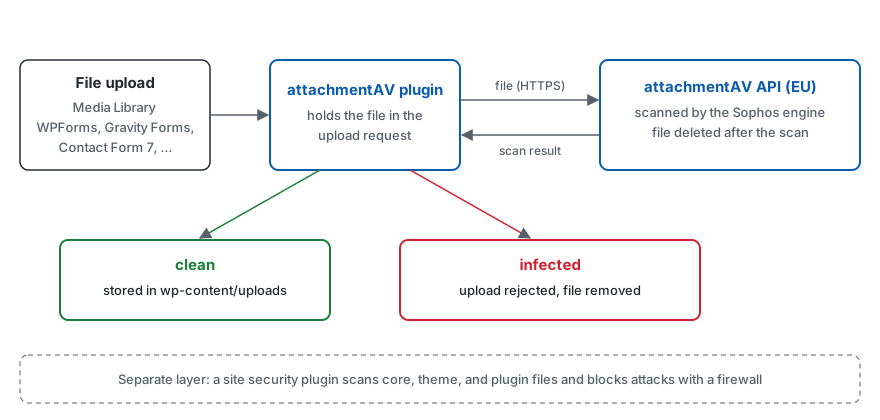
- A visitor or author uploads a file through the Media Library or a supported form plugin.
- The attachmentAV plugin sends the file to the attachmentAV API over HTTPS.
- The API scans the file with Sophos and deletes it right after the scan.
- The API returns the scan result:
clean,infected, orno(the file could not be scanned). - The plugin accepts clean files and rejects infected ones with an error message.
An infected file never makes it into your site: it doesn’t appear in the Media Library, isn’t attached to a form entry or notification email, and is removed from the server. For files that pass, the Media Library shows attachmentAV Scan Result: clean in the file’s details. The concepts page explains exactly where the scan hooks into each upload method.
attachmentAV covers the core Media Library and the most popular form plugins:
- WPForms (guide)
- Gravity Forms (guide)
- Formidable Forms (guide)
- Forminator (guide)
- Contact Form 7, including Drag and Drop Multiple File Upload for Contact Form 7 (guide)
- WordPress File Upload (guide)
Set up attachmentAV for WordPress
The setup takes a few minutes and doesn’t require any code.
- In the WordPress admin area, open Plugins, search for
attachmentav, and click Install Now. - Activate the plugin and follow the Settings link.
- Click Subscribe to attachmentAV to create a subscription and get your API key.
- Paste the API key into the plugin settings and click Save Changes.
- Upload a file to the Media Library and check its details for
attachmentAV Scan Result: clean.
To see a detection, upload the EICAR test file, a harmless file that every antivirus engine reports as malware. The setup guide walks through every step with screenshots.
Running a WordPress Multisite network? You can network-activate the plugin, but the settings are stored per site. Enter the API key in Settings > attachmentAV of every site that should scan uploads, as described in the FAQ.
Decide what happens with unscannable files
Some files can’t be scanned: files larger than 10 MB and files the engine can’t open, such as encrypted archives. By default, attachmentAV allows unscannable files, so a password-protected ZIP from a customer still goes through.
If your forms don’t need such files, enable Block unscannable files in Settings > attachmentAV. attachmentAV then removes unscannable files from the server in the same way as infected files. This is the safer choice for public forms, where an encrypted archive is a common way to sneak malware past a scanner.
What you get with attachmentAV
- A commercial engine. Files are scanned by Sophos with continuously updated signatures. There’s no ClamAV daemon to install on your web server and no signature database to keep up to date.
- Protection before storage. Infected uploads are rejected during the request, not found by a scan hours later.
- No server load. The scan runs in the attachmentAV API, not on your hosting.
- Data protection. attachmentAV is ISO 27001 certified and GDPR compliant. The plugin processes files in the EU, encrypts them in transit and at rest, and deletes them immediately after the scan. Read the security page for details.
Building your own application instead of a WordPress site? The same scan is available as an API with SDKs for PHP, Python, Java, and JavaScript. See Secure File Upload: How to Scan Uploads for Malware and Virus Scan for Laravel.
Secure your WordPress uploads today
A WordPress antivirus plugin keeps attackers out of your code. attachmentAV keeps malware out of the files your visitors and authors upload, by scanning every file with Sophos before WordPress stores it. Use both, and your site is protected on both fronts.
Try attachmentAV for WordPress with a 14-day free trial and scan every upload for malware.
Published on November 9, 2026 | Written by Andreas