attachmentAV for WordPress: Concepts
attachmentAV for WordPress scans every file upload in real time and blocks infected files before they become part of your site.
How a scan works (#)
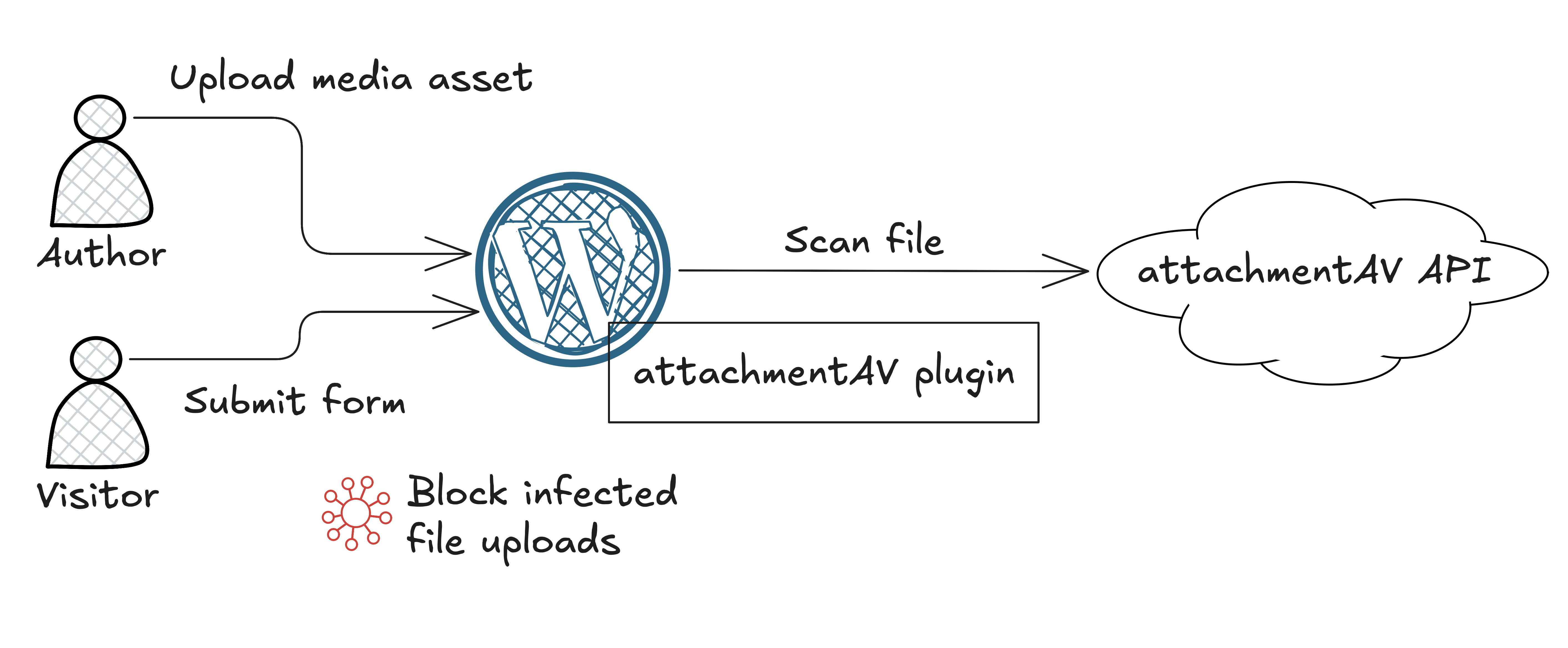
- A user uploads a file to WordPress (Media Library or a supported form plugin).
- The attachmentAV plugin sends the file to the attachmentAV API over encrypted HTTPS.
- The attachmentAV API temporarily stores the file on an encrypted disk.
- The attachmentAV API scans the file with the Sophos engine.
- The attachmentAV API deletes the temporary file from the encrypted disk.
- The attachmentAV API returns the scan result:
clean,infected, orno(unscannable). - Depending on the scan result, the plugin passes or blocks the upload.
The scan happens synchronously while WordPress processes the upload. An infected file is blocked before the upload or form submission completes: it does not appear in the Media Library, is not attached to a form entry or notification email, and the uploader sees an error message instead.
Where does attachmentAV process the data (region)? (#)
The plugin sends files to the attachmentAV API endpoint https://eu.developer.attachmentav.com, which processes all data in the EU (European Union). Files are stored only for the duration of the scan — on encrypted disks — and are deleted immediately afterwards. See Security for details.
Are uploaded files stored on my WordPress server? (#)
Yes, temporarily — WordPress and the form plugins write every upload to a temporary location on the web server before any plugin can inspect it; attachmentAV cannot change that. What attachmentAV guarantees is that an infected file never makes it from that temporary location into your site: depending on the upload method, the plugin either blocks the file while it is still in PHP’s temporary upload folder — which PHP discards automatically at the end of the request — or deletes the file from disk immediately after the scan detects an infection.
The details differ per upload method:
Media Library (#)
attachmentAV hooks into the WordPress upload pipeline (wp_handle_upload_prefilter) and scans the file while it is still in PHP’s temporary upload folder — before WordPress moves it into wp-content/uploads. If the file is infected, the upload is rejected with an error message: the file never reaches the Media Library, and PHP deletes the temporary file automatically at the end of the request.
For files that pass the scan, the scan result is stored in the attachment metadata — open the details of a media file to see attachmentAV Scan Result: clean. As an additional safety net, attachmentAV also scans every file that is added to the Media Library programmatically (bypassing the regular upload pipeline); if such a file turns out to be infected, the attachment and its file are permanently deleted.
Formidable Forms (#)
Formidable Forms uploads files through the WordPress Media Library pipeline, so the Media Library mechanism above applies: infected files are blocked while still in PHP’s temporary upload folder and never reach wp-content/uploads.
WPForms (#)
WPForms stores uploaded files in its own folder under wp-content/uploads/wpforms/ before the form entry is saved. attachmentAV scans each stored file while WPForms processes the submission. If a file is infected, attachmentAV immediately deletes it from disk, rejects the form submission, and shows an error message to the user.
Gravity Forms (#)
attachmentAV scans uploads during form validation, before Gravity Forms moves files to their permanent location:
- Single-file upload fields: The file is scanned while it is still in PHP’s temporary upload folder. If it is infected, validation fails and PHP deletes the temporary file automatically at the end of the request.
- Multi-file upload fields: Gravity Forms stores the files in its temporary folder (
wp-content/uploads/gravity_forms/<form>/tmp/) as they are uploaded. If a file is infected, validation fails, so the file is never moved into the permanent upload folder; the temporary copy is removed by Gravity Forms’ automatic cleanup of its temporary folder.
Forminator (#)
Forminator stores uploaded files on disk while processing the submission. attachmentAV scans each file during submission processing. If a file is infected, attachmentAV immediately deletes it from disk and rejects the submission with an error message.
Contact Form 7 (#)
Contact Form 7 saves uploads to its temporary folder while validating the submission. attachmentAV scans the file during validation. If it is infected, the form field is invalidated — the email is not sent and the file is not attached — and attachmentAV immediately deletes the temporary file from disk.
Drag and Drop Multiple File Upload for Contact Form 7 (#)
Files are scanned during the AJAX upload request, before the form is even submitted. If a file is infected, attachmentAV immediately deletes it from disk and rejects the upload request with an error message.
WordPress File Upload (#)
The WordPress File Upload plugin writes the file to the configured upload folder. attachmentAV scans the file right after it has been written. If it is infected, attachmentAV immediately deletes it from disk and shows an error message to the user.
Unscannable files (#)
Some files cannot be scanned: files larger than 10 MB and files the engine cannot open (for example, encrypted archives). By default, attachmentAV allows unscannable files. Enable Block unscannable files in Settings > attachmentAV to block them instead — blocked unscannable files are removed from the server in the same way as infected files.